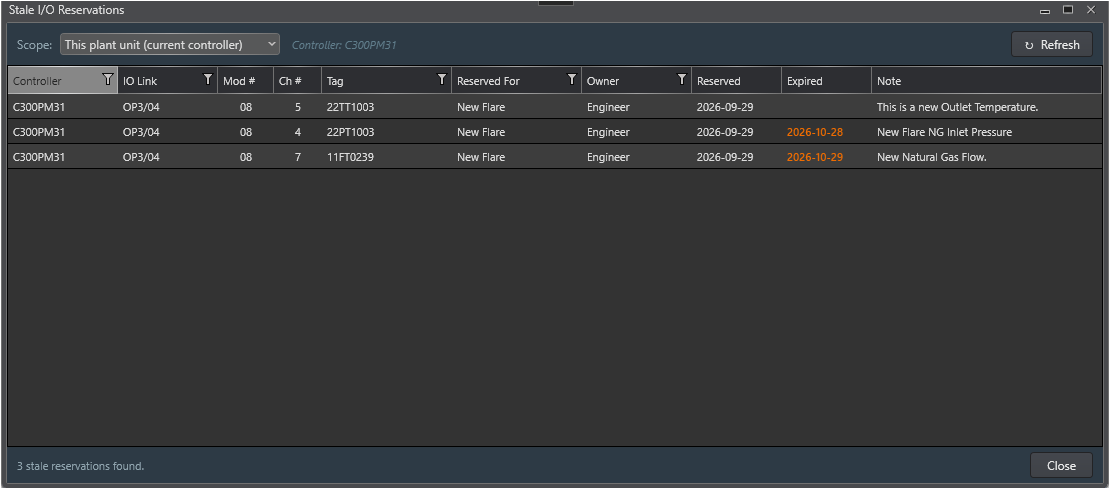
The Stale Reservation Report dialog lists every IOSparesDb reservation record whose Undo by date has elapsed or that has been flagged Stale by a Reconcile pass. It provides a single consolidated view of all reservations that require review, without the need to navigate to each slot individually in the LCN Hardware View.
Opening the Report
1. In the LCN Hardware View ribbon, click Stale Reservations... in the Reconcile group (key tip: SR).
2. The dialog opens and immediately loads stale records for the selected scope.
3. Use the Scope drop-down to switch between plant unit and whole-plant views.
Scope Selector
Scope
Records shown
This plant unit
Only stale records belonging to the xPM controller currently selected in the LCN Hardware View diagram. Use this scope for day-to-day maintenance during a project.
Whole plant
All stale records across every controller in IOSparesDb - both xPM and PKS - regardless of which controller is selected. Use this scope for periodic plant-wide housekeeping reviews.
Note When no xPM controller is selected in the diagram, the scope automatically falls back to Whole plant.
Grid Columns
Column
Description
Controller
The xPM controller that owns the stale slot (e.g. HPM13).
IO Link
The LCN/UCN network path of the controller (e.g. LCN01/UCN10).
Mod #
The I/O Module number (MODNUM).
Ch #
The slot number within the module (SLOTNUM).
Tag
The tag stored in the reservation record at the time it was created.
Reserved For
The project name the slot was reserved for.
Owner
The display name of the engineer who created the reservation.
Reserved
The date the reservation was originally created.
Expired
The Undo by date, shown in amber to indicate it has elapsed.
Note
The free-text note from the reservation record. Hover to see the full text in a tooltip.
Toolbar Buttons
Button
Action
↻ Refresh
Reloads stale records from IOSparesDb using the currently selected scope. Use after making corrections in the Slot Reservation dialog to confirm records have been resolved.
Close
Closes the report dialog.
Acting on Stale Records
The report is read-only - corrections must be made in the Slot Reservation dialog. For each stale record, the recommended workflow is:
1. Note the Controller, IO Link, Mod #, and Ch # values from the report row.
2. In the LCN Hardware View, click that xPM controller in the diagram, select the I/O Module, and click the slot's Status badge to open the Slot Reservation dialog.
3. Review the stale banner details and take one of the following actions:
Re-reserve - update the project details and set a new Undo by date, then click Save.
Clear - if the slot is no longer needed for the project, click Clear to return it to Available status.
4. Return to the Stale Reservation Report and click ↻ Refresh to confirm the record has been removed from the list.
Tip - Routine maintenance check Run the Stale Reservation Report with Whole plant scope at the start of each project phase or monthly to catch reservations that engineers may have forgotten to release after their project completed.
Empty State
When the query returns no stale records, the report displays a green confirmation panel: No Stale Reservations Found, along with the active scope description. This is a positive result - it confirms the spare pool records are clean for that scope.