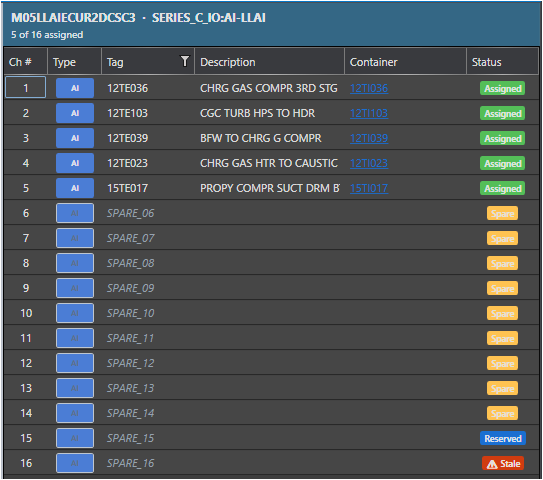
Every I/O channel tracked by the I/O Spares Management module carries one of six reservation statuses. The status reflects the full life-cycle of the channel - from an unrecorded spare through to a commissioned point that has been formally released back to the pool.
Status Reference
Status
Meaning
Typical next action
None
No IOSparesDb record exists for this channel. The channel may or may not be a spare - no engineer has interacted with it yet.
Open the Channel Reservation dialog and reserve it, or leave it unrecorded if it is not a spare.
Available
A record exists in IOSparesDb and the channel is confirmed as a spare with no active reservation. This status is set when a previous reservation is cleared or released.
Reserve it for a project when needed.
Reserved
The channel is earmarked for a named project. An engineer has saved a reservation with a project name, owner, optional undo date, and optional note.
Wait for the project to commission the channel, then run Reconcile to detect commissioning automatically, or release it manually if the project is canceled.
Assigned
The channel was reserved and has since been detected as commissioned in the hardware snapshot during a Reconcile pass. It is no longer a spare.
Release the reservation formally to return the record to Released.
Released
The reservation has been formally closed. The engineer has confirmed the channel is either back in the spare pool or permanently assigned and no longer needs tracking.
No further action required. The record is retained for audit purposes.
Stale
The reservation has become invalid. Either the Undo by date has elapsed without manual intervention, or a Reconcile pass detected a discrepancy - for example, the channel tag changed, the module was moved, or the channel was commissioned without a formal release.
Open the channel in the Channel Reservation dialog, review the situation, then either re-reserve with a new deadline or clear the record.
Reservation Life-cycle Diagram
Channel is a Spare
Status: None or Available
|
| Engineer clicks Reserve
v
+--------------------------+
| Status: Reserved |
| Undo date: (optional) |
+-----------+--------------+
| |
Reconcile | | Undo date elapses
detects | | (Reconcile pass)
commission | v
v +----------------+
+------------------+ | Status: Stale | <-- Review required
| Status: Assigned| +-------+--------+
+--------+---------+ |
| Release | Engineer corrects
v v
+------------------+ Status: Reserved
| Status: Released | (re-reserved or cleared)
+------------------+
Note - Released records are retained Released records are kept in IOSparesDb for audit and reporting purposes. They are not deleted. A Released channel can be re-reserved if needed - a new reservation simply overwrites the existing record.
How Statuses Are Set
Status
Set by
None
Default - no IOSparesDb record exists for the channel.
Available
Engineer or SuperAdmin clears an existing reservation via the Clear button in the Channel Reservation dialog.
Reserved
Engineer, Technician, or SuperAdmin saves a new reservation via the Save button.
Assigned
Set automatically by the Reconcile pass when it detects that a reserved channel now has an active tag assignment in the hardware snapshot.
Released
Engineer or SuperAdmin clicks Clear on an Assigned channel, confirming formal release.
Stale
Set automatically by the Reconcile pass when the Undo by date has elapsed, or when a discrepancy is detected between the reservation record and the current hardware snapshot.
Tip - Color coding in exports The Export All Hardware I/O Channels workbook uses row background colors to highlight reservation status at a glance: blue for Reserved, amber for Stale, green for Assigned, and gray for Released.