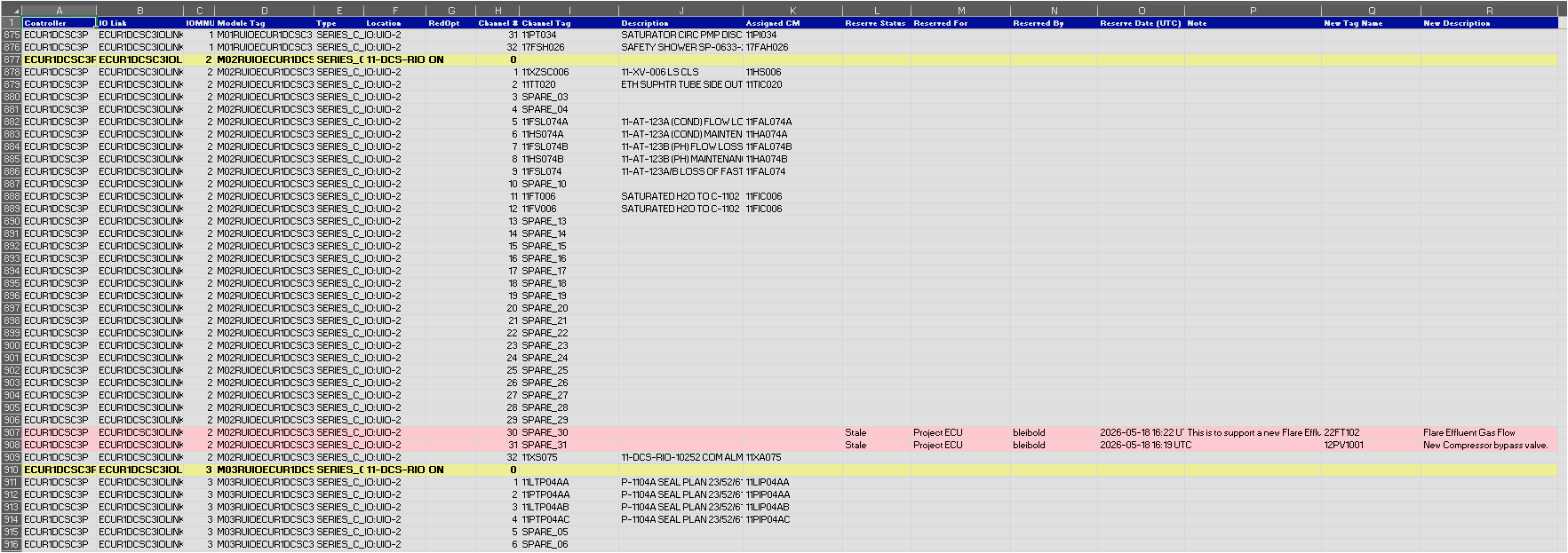
The Export All Hardware I/O Channels... command exports a single Excel workbook that mirrors the full I/O slot structure visible in the PKS Hardware View for the loaded community, cross-referenced with live reservation data from IOSparesDb. Unlike the Export Reserved I/O to Excel command, which shows only channels that have a reservation record, this export includes every module slot - whether reserved, spare, or fully wired - giving a complete picture of the hardware inventory.
2. Click Export All Hardware I/O Channels... in the Export ribbon group (key tip: EH).
3. A Save File dialog opens. Choose a file name and location; the .xlsx extension is added automatically.
4. The workbook is written and a confirmation message is displayed.
Note The Export All Hardware I/O Channels button is grayed out until a hardware community has been loaded.
Workbook Structure
The workbook contains a single worksheet with a two-level row structure:
Module row - one row per module slot in the rack, showing controller, IO link, slot number, module tag, type, location, and redundancy option. Channel-specific columns are blank on module rows.
Channel rows - one row per channel within the module, indented beneath its parent module row, showing the channel tag, description, assigned CM block, and all reservation fields.
Module rows with at least one channel that carries a non-None reservation status are highlighted with a light blue background to make them easy to identify when scrolling through a large workbook.
Columns
#
Column
Populated on
Description
1
Controller
Module row
The parent controller tag.
2
IO Link
Module row
The I/O Link identifier.
3
Slot
Module row
The slot number in the rack.
4
Module Tag
Module row
The engineering tag of the IOP module.
5
Type
Module row
The IOP hardware type (e.g. FTA-16AI).
6
Location
Module row
The physical location label.
7
RedOpt
Module row
The redundancy option.
8
Channel #
Channel row
The channel number within the module.
9
Channel Tag
Channel row
The Experion parameter tag assigned to this channel. Blank for unwired spare channels.
10
Description
Channel row
The description of the channel parameter.
11
Assigned CM
Channel row
The control module or CM block the channel is assigned to.
The display name of the engineer who created the reservation.
15
Reserve Date (UTC)
Channel row
Date and time the reservation was created or last modified.
16
Note
Channel row
The free-text note from the reservation record.
Row Color Coding
Color
Meaning
Blue
Channel has an active Reserved status.
Red / Amber
Channel is Stale - requires review.
Green
Channel has been Assigned (commissioned since reservation).
Gray
Channel reservation has been Released.
(no color)
Channel has no reservation record (None) or is fully wired with no reservation history.
Tip - Use this workbook for field engineering reviews The two-level module/channel structure makes this workbook well-suited for use in engineering design reviews, loop verification workshops, and field walk-down documentation because it preserves the physical rack layout of the hardware.