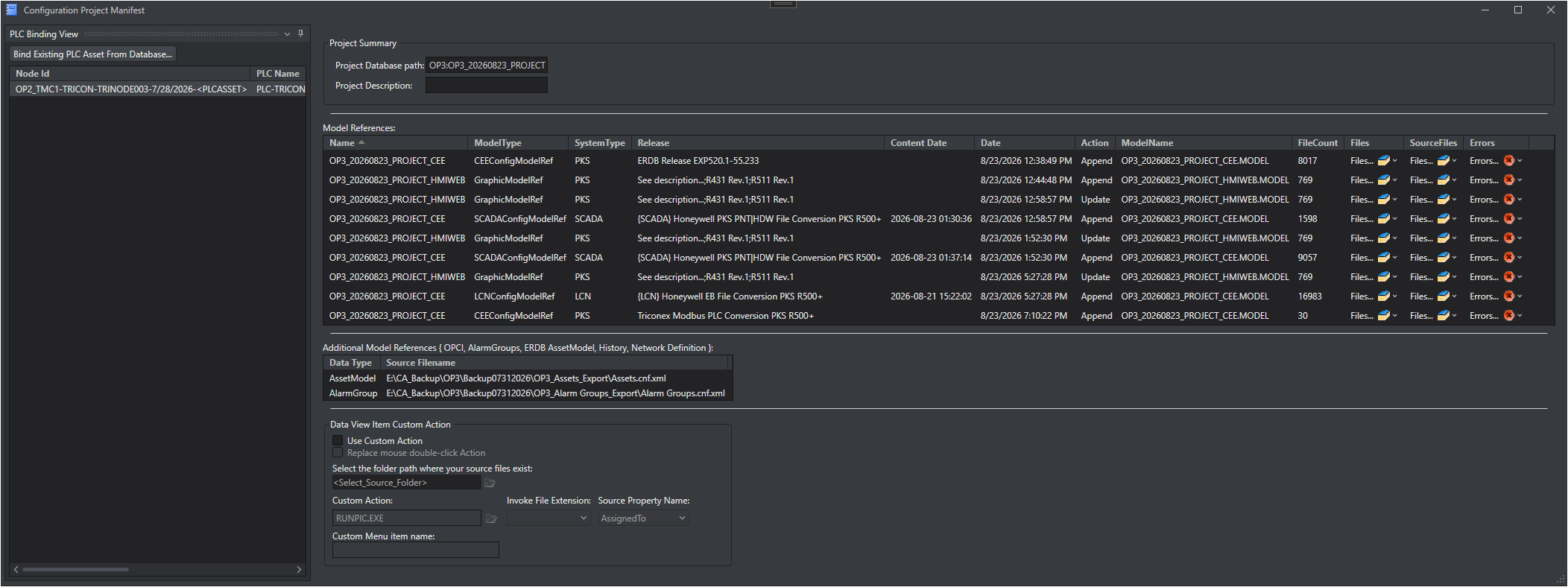
The Configuration Project Manifest window summarizes everything that has been generated into, imported into, or bound to a single configuration asset collection (Collection Snapshot). It is the central place to review the import history of a collection, describe the project, configure a Data View Item Custom Action, and manage which PLC Assets are bound to the collection.
Why It Exists
A Collection Snapshot is typically built up over time from many sources - LCN, PKS, SCADA, OPCI, Alarm Group, ERDB Asset Model, History, and Network Definition data, as well as PLC Assets that may be shared between several collections. The Manifest keeps an auditable timeline of these imports and binding actions so engineers can see exactly what a collection contains, where it came from, and when.
Window Layout
The Manifest window is divided into two docked areas:
Area
Contents
PLC Binding View (left tool window)
Lists the PLC Assets bound to the current Collection Snapshot and provides commands to bind, move, unbind, or delete them. See PLC Binding View.
The Manifest is stored with the Collection Snapshot and is identified by the Project Database path. PLC Asset binding records are stored in the MongoDB database of the collection, in the PLC Assets GridFS bucket, and a single PLC Asset may be bound to several Collection Snapshots in the same database.
Note PLC Asset binding actions (Bind, Move, Unbind, Delete) are recorded in the Manifest timeline immediately, even if you choose not to save other changes when closing the window.